
When you arrive at the health center sick, you want an answer at a glance: where do I go now? Public spaces are filled with elderly people, people with strollers, people of different language groups, people with visual and hearing impairments, people with neuro-spectrum disorders, and people working in the building. An office or health center can be a large and labyrinthine building where it is difficult to find the right place. By investing in accessibility, transactions are made easier and the visitor experience is improved.
Accessibility in public spaces is not a single feature, but a collection of smart choices. The good news: digital displays, audio, and centralized content management make these choices easier to implement. At their best, they form a communication layer for a smart building that adapts to the situation. In practice, accessibility can be improved through the systematic placement of signage, clear visuals, and communication that takes into account different types of visitors.
Digital communication solutions offer a variety of ways to improve the accessibility of public spaces. This article will review how different user groups can be helped and reached with digital displays and other digital communication solutions in public spaces.
Accessibility of public spaces means that the space is easy to find, understand and use. It involves barrier-free routes, clear signage, functional service paths and information being available even when reading, hearing or doing business is challenging.
In practice, accessibility is reflected in the fact that visitors quickly understand:
When these are in place, transactions become smoother and the visitor experience improves. Accessibility in public spaces means less confusion, fewer questions at the counter, and less unnecessary wandering in the hallways.
In public spaces, there are often many different needs to communicate to users: instructions and signage help the user find the right place, register at the right counter, or ask the right person for advice.
For example, a health care center often has a huge number of doors, corridors and floors, as well as numerous different services. In such a space, accessibility is built through signage, lighting and sound. Interactive signage, user-activated sound showers and well-designed background music make it easier to find the right place, streamline transactions and clearly improve the visitor experience.
Accessibility improves fastest when you think about space in terms of user groups. The same screen can serve many when the content and implementation are right.
Visually impaired and low-vision people benefit from strong contrast, a sufficiently large font, and not placing the screen in a place where reflections impair readability. It is worth summarizing an important point: if it takes half a minute to read a sign, the content should be broken up.
For the hearing impaired, it is critical that information is not only based on sound. Videos have subtitles, announcements have a visual equivalent, and instructions can be read even without hearing.
For those with cognitive challenges, clarity is gold: simple language, phasing (“1. Sign up 2. Wait 3. Go”), and a calm visual rhythm help. The same goes for many stressed-out visitors, which is practically all of us on Monday mornings.
For older people, large typography, sufficient breaks between content changes, and a “one-glance” logic work. If the message changes so quickly that only reflexes can keep up, it is more of an athletic performance than a sign.
For different language groups and travelers, multilingualism, plain language, and icons reduce errors and improve safety. In public spaces, language versions are not just a courtesy, they are practical accessibility.
When digital displays and content management are integrated into the everyday life of a property, they become a significant communication layer for the space. This means that guidance is not static, but can be used to react to the situation.
For example:
Digital signage displays are a quick and effective way to increase the visibility of a space. A good basic solution is to have a clear map or summary near the entrance: what is in this building and how do I get there?
Effective guidance on digital signage is often built on three principles:
1. First, placement matters. Displays are needed at entrances, intersections, elevator lobbies, and near service points, where decisions are made.
2. Second, content logic. A good digital signage answers three questions quickly: where am I, where am I going, how do I get there. The “three-second rule” applies here: if the core of the message doesn’t unfold in three seconds, it needs to be simplified.
3. Third, readability and accessibility. Screen brightness, resolution, contrast, font size and color reproduction are essential, but equally important is minimizing reflections through placement and surface choices. A screen can be technically top-notch, but if it’s backlit in a shiny lobby, it becomes a decoration.
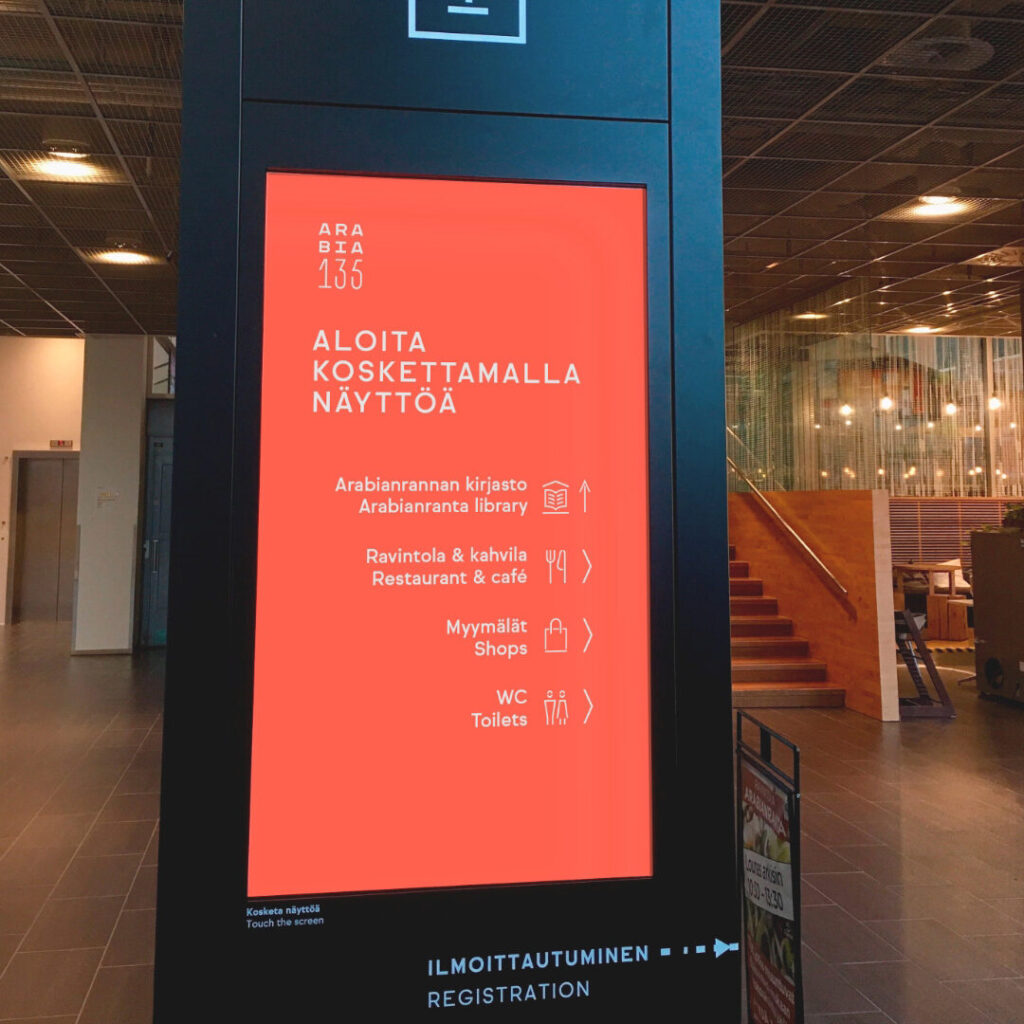
Interactive displays enable even more extensive instructions right in the lobby. Interactive signage is a good way to welcome visitors to a large public space, such as a hospital or city hall: visitors can quickly find the best route to the department or service they need using the display.
Interactive guidance can show the route, floor-specific services and accessible options. It can also serve in different languages and provide a plain-language view. The practical benefit is clear: less wandering, fewer inquiries, smoother transactions.
In addition to visual digital signage, it is also a good idea to utilize audio guidance in accessible spaces. Audio guidance can be automated – the user can activate it themselves or it can be activated when the user arrives at a specific location. Targeted solutions, such as sound showers or directional speakers, can inform about services on a floor or point you in the right direction without the entire lobby listening in.
This is especially helpful for visitors who find it difficult or impossible to read digital signage, and also supports situations where stress or rushing can impair concentration.
Well-designed lighting highlights the routes or spaces in the space that the user needs to find. When designing lighting, it is also a good idea to take reflective mirror and glass surfaces into account. The focus of the lights should be designed so that reflections do not create additional challenges for interpreting digital signage and instructions. For example, healthcare facilities need both bright lighting for viewing documents and softer, calm light, for example in waiting areas.
When lighting can be controlled and automated, it can also be used to support guidance: highlighting important routes, illuminating signs more brightly than other spaces, or adjusting light intensity according to the situation. This connects directly to PropTech thinking: lighting, guidance, and communication are not separate islands, but the same user experience.
The soundscape has a strong influence on how a space feels and can also help with accessibility. For example, a change in background music or soundscape can help you perceive that you have entered a new space. It is a small but effective cue, especially when there is a lot of visual information. In addition, background music can create a calming or, if necessary, activating atmosphere: for example, music in a dentist’s waiting room can relax and calm you.
Calm, protect and engage: The benefits of sound landscaping in health care »
Another essential aspect is privacy protection. The soundscape can also protect the privacy of those who use the space. At a pharmacy’s prescription counter, a health center’s reception, or an office’s lobby, a sound privacy protection can create privacy by preventing the recipient and customer’s conversation from being heard by others waiting for their turn in the lobby or passing by the reception counter. This is responsibility in practice: the visitor can shop more calmly, and the space feels safer.
Read more on the blog about how sound masking improves privacy »
Read also the case of Orimattila pharmacy: privacy can be improved with audio »
Centralized content management enables content to be updated, scheduled, and automated from one place. All digital signage in even a large public complex can be updated at once and, if necessary, information such as rush hour information, service queues, and exceptional schedules can be scheduled on the screens.
Accessibility here comes from two things: having the right information in the right place, and having the content designed to be accessible. In practice, this means having a sufficiently large font and clear contrasts, a loose layout, and presenting the same information in at least two formats (e.g. text + icons).
It is worth planning multilingualism according to real user groups. Not everything needs to be translated, but it is worth translating the most important service paths and exception messages.
Additionally, critical messages, exceptional situations, and safety instructions are at the heart of accessibility. When the situation changes, the message must change with it.
Accessibility in public spaces can increase and improve encounters. Visitors can utilize the spaces more diversely and efficiently, and the impression of the service is more positive, meaning the visitor experience is improved.
Incorporating accessibility into the design of space communication and digital signage enables more and more user groups to use the space smoothly and comfortably. Improving accessibility reduces barriers to encounters and helps all user groups use services more equally.
A person arriving at a health center may be worried and in poor physical condition, but well-planned guidance can help them find the right place smoothly. By improving its accessibility, a library can strengthen itself as an important meeting place for the community, where services can be found without a threshold.
At its best, a public space is an easily approachable place where visitors and service providers encounter each other genuinely and positively – and where the space does its part, rather than making people do all the work.
Read also: Digital communication strengthens visitor experience in properties »
Start by mapping the visitor path: where visitors get lost, stressed, or stuck. Next, define the guidance points and content logic: entrances, intersections, elevator lobbies, and service points are usually critical. Finally, create a governance model: who updates content, at what rate, and how exceptions are handled.
If you want, we can help with this. Contact our experts and we’ll walk you through your user journey together.